

Features & Quick Start
Everything Galleria does, and how to get a gallery online in about two minutes.
Quick Start
From a folder of photographs to a published website. The first four steps are all you need if you just want a folder you can upload yourself.
1. Make a gallery
⌘N. Give it a title — that is what visitors see at the top of the page.
2. Add your photographs
⇧⌘A, or drag a folder onto the window. Galleria references your originals where they are and never modifies them. JPEG, HEIC, PNG, TIFF and most raw files.
3. Put them in order
Drag to rearrange, or sort by capture date, name or filename. ⌥⌘← and ⌥⌘→ nudge a selection. Anything you would rather not publish, hide — it stays in the gallery and stays out of the website.
4. Write the captions that matter
Select a photograph and type in the inspector. Alt text is separate from the caption and worth filling in: it is what a screen reader says, and Galleria tells you how many are still empty before you publish.
5. Set up where it goes
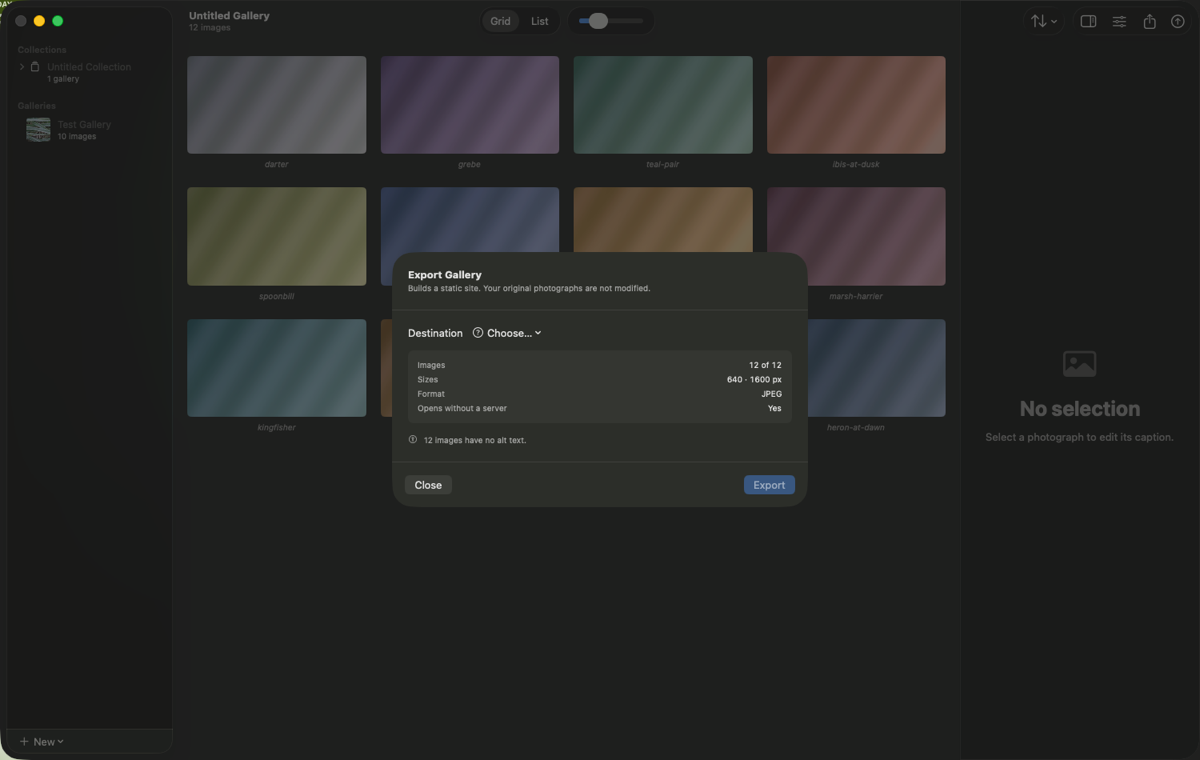
⇧⌘E, then choose a destination. A folder works immediately. For a server, pick Add Server…, fill in six fields, and press Test Connection — it checks the whole path before you have anything to lose.
6. Publish
Press Export. After that, ⇧⌘P publishes again with no dialog at all, sending only what changed.
Complete Feature List
Importing
Drag a folder or a selection of files onto the window, or use ⇧⌘A
Sub-folders are left alone unless you ask for them
JPEG, HEIC, PNG, TIFF and most raw formats macOS can read
Originals are referenced where they live and are never modified
Capture date, camera, lens and exposure read from each file
Duplicate detection, so importing the same folder twice does not double it
Arranging
Grid and list views, with an adjustable thumbnail size
Drag to reorder; ⌥⌘← / ⌥⌘→ to nudge a selection
Sort by capture date, filename or title, ascending or descending
Move to beginning and move to end for the cover shot and the closer
Hide a photograph: kept in the gallery, excluded from the website
Multi-select with click, shift-click and ⌘-click
Full undo and redo throughout
Captions & accessibility
A caption and separate alt text per photograph
Captions shown always, on hover, in the lightbox only, or never
Alt text is what a screen reader reads; Galleria counts how many are missing
Optional EXIF strip in the lightbox — camera, lens, focal length, aperture, shutter, ISO
Sequence numbers, if you want them
The website it builds
Justified rows or a single column
Column counts set separately for phone, tablet, desktop and wide screens
A lightbox that loads only the image you are looking at and its neighbours
Pagination above a threshold you choose, so a thousand-image gallery is not one page
Header, intro text, footer, copyright, contact link and a back link to your own site
Sitemap and robots.txt, or a “discourage indexing” switch for a private client gallery
Custom CSS and custom head content when you need an escape hatch
Output that opens straight from disk — double-click index.html, no server required
Image quality
Several sizes per photograph, and a responsive srcset so browsers pick the right one
JPEG or AVIF output
Quality you choose, per gallery
sRGB or Display P3, converted properly rather than re-tagged
ICC profile always embedded, even when metadata is stripped
Orientation baked into the pixels, so nothing is rotated twice
Never upscaled beyond the original
Privacy in the output
GPS stripped by default — publishing nest or den coordinates is a real harm
Copyright and IPTC byline kept by default, because stripping those is not privacy
Or strip everything, or keep everything — your choice, per gallery
Filenames derived from the original filename by default, so links do not break when a caption changes
Publishing
SFTP to your own server, with password or SSH private key
Host key verified on first connection and pinned afterwards
Passwords and keys in the macOS keychain — never in the gallery file
Incremental: only added and changed files are uploaded
A renamed gallery moves files on the server instead of re-uploading them
Concurrent uploads over a single connection
Assets land before the pages that reference them, so a live site is never broken mid-publish
Interrupted publishes resume instead of starting again
Optional cleanup of files a previous publish left behind — and never anything Galleria did not write
Or export to a folder, and put it online however you like
Collections
Several galleries published as one site, with an index page linking to each
A card title and address per gallery, independent of the gallery’s own title
Addresses frozen once published, so links people already have keep working
A member can be hidden: kept in the collection, left out of the site
Each gallery keeps its own layout and captions; the collection sets image quality
The app itself
Native Apple silicon, sandboxed, no helpers and no background processes
Nine languages: English, German, Spanish, Latin-American Spanish, French, Canadian French, Hebrew, Japanese, Simplified and Traditional Chinese
Full keyboard control, with every shortcut in the menus
Consolidate Originals copies every referenced photograph into the gallery file, so a gallery can travel between Macs — and this is never gated
Missing originals are detected and can be relinked
No account, no telemetry, no analytics, no tracking of any kind
What It Costs
Free and fully functional for 30 days — the whole app, not a trimmed-down version, with no watermark and no cap on how much you can publish.
After 30 days: $9.99 a year, or $29.99 once if you would rather not have a subscription
What the payment unlocks is exporting and publishing
Opening, editing, organising and captioning your galleries is never gated
Consolidate Originals is never gated — you can always get every photograph back out at full resolution
Everything you have already published stays published, whatever you decide